
sc2seisan: Exports SeisComP events to SEISAN S-files
sc2seisan exports SeisComP events to SEISAN S-files. Its sister module seisan2sc works in the other direction (SEISAN → SeisComP). Each works on its own; customers use one, the other, or both.
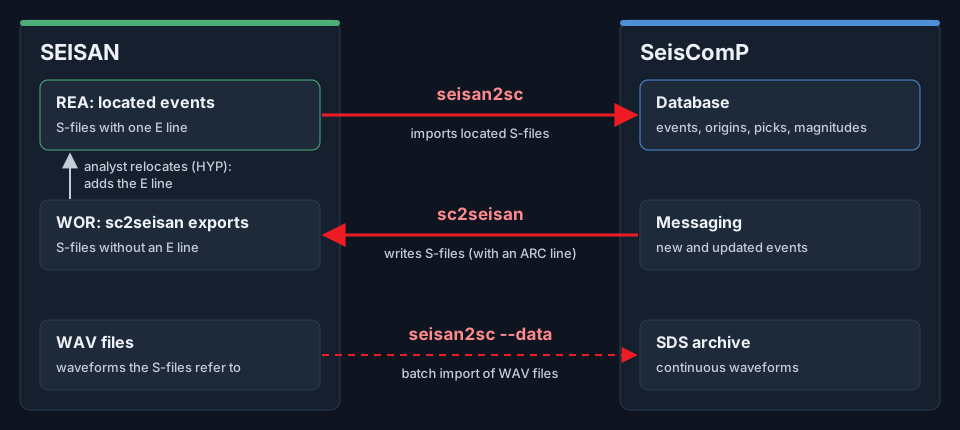
How seisan2sc and sc2seisan move data between SEISAN and SeisComP.
sc2seisan runs in two modes:
Real-time mode: listens to SeisComP for new or updated events and writes an S-file for each.
Convert mode: converts one SeisComP XML file (e.g. from
scxmldump) to an S-file, and exits.
sc2seisan adds an ARC line to each S-file, so SEISAN can read the waveforms from the SDS archive. If the S-file already
exists, sc2seisan overwrites it, unless the S-file’s author differs from sc2seisan’s own (sfile.author): S-files
saved by an analyst under another author are never overwritten.
Installation and license
sc2seisan is installed on the SeisComP machine with the installer OSOP provides (sc2seisan-install.sh). It needs
Docker, and the installer downloads the official SeisComP package it builds on. Then:
Print the machine ID and send it to OSOP:
$ sudo sc2seisan id
Save the license file OSOP sends back as
/opt/osop/license/sc2seisan.key, and check it:$ sudo sc2seisan check
seiscomp start sc2seisan refuses to start without a valid license and prints the machine ID.
Mode 1: Real-time mode
Configure sc2seisan in scconfig (Modules >> OSOP >> sc2seisan), save and exit. Set the database connection (database), the output directory (sfile >> outdir) and the filters.
Enable and start sc2seisan:
$ seiscomp enable sc2seisan
$ seiscomp start sc2seisan
Check it is running:
$ seiscomp status sc2seisan
Note
filter.agencies (default OSOP) and filter.authors (default osop) limit which events are
exported. Events located under another agency or author, e.g. by SeisComP’s own modules, are not exported until you
add them or clear the filter.
Mode 2: Convert mode
Convert one SeisComP XML file to an S-file:
$ sc2seisan run --convert /path/to/event.xml
The S-file is written to sfile.outdir.
S-files and SEISAN
sc2seisan writes no type E line (hypocenter errors). The E line is written by SEISAN’s locator when an analyst relocates the event in SEISAN. This matters when seisan2sc imports from the same SEISAN tree: seisan2sc imports only S-files with exactly one E line, so it never re-imports sc2seisan’s own exports, and events don’t loop between the two systems.
The S-file is named after the origin time of the event’s preferred origin, following SEISAN’s convention.
Implementation
Network and location codes
SEISAN uses only station codes; network and location codes are not written. Stations with the same station code in different networks or locations can’t be told apart in SEISAN.
Phases and weights
Each arrival of the preferred origin is written as a phase line, subject to filter.maxDistance and the
streams.blackList / streams.whiteList filters. Arrivals without a distance or azimuth are kept, with those
fields left blank. The phase-line columns are mapped as SEISAN defines them:
SeisComP |
S-file column |
Notes |
|---|---|---|
pick onset impulsive / emergent |
Onset I / E |
blank if not set |
arrival weight 1.0 / 0.75 / 0.5 / 0.25 / 0 |
Weight blank/1/2/3/4 |
nearest step |
arrival time not used in the location |
Weight 4 |
e.g. deactivated in scolv |
automatic pick |
A |
blank for manual picks |
pick polarity positive / negative |
First motion C / D |
Magnitudes
Up to three magnitudes are written, chosen in the order of filter.magnitudes_order. Magnitude letters follow the
SEISAN manual: ML-family → L, mb → b, mB → B, Ms → s, MS → S, Mw-family → W, Md/Mc → C, MbLg → G, MN → N. SeisComP
magnitude types without a SEISAN letter (e.g. the summary magnitude M, or Mwp) are not written. seisan2sc uses the same
table in the other direction.
Logging
Logs are written to ~/.seiscomp/log/sc2seisan.log of the SeisComP user. sc2seisan logs shows the service’s
console output.
Technical support
If you have any questions, contact OSOP support at support@osop.com.pa.
Configuration
Set these in scconfig (Modules >> OSOP >> sc2seisan) or in sc2seisan.cfg. The defaults are in $SEISCOMP_ROOT/etc/defaults/sc2seisan.cfg.
- filter.maxDistance
Type: float
Default:
100Stations within this radial distance from the epicenter are written to the S-file unless they are declared at stations.blackList. If not defined, defaults to unlimited radial distance from epicenter. Units: Kilometers
- filter.minPhases
Type: integer
Default:
6Origins with at least this many number of phases will be accepted. If not defined, defaults to any number of phases.
- filter.agencies
Type: string
Default:
"OSOP"Comma separated list of agencies from which origins are accepted. Case sensitive. If not defined, accepts events with any agencyID.
- filter.authors
Type: string
Default:
"osop"Comma separated list of authors from whom origins are accepted. Case sensitive. If not defined, accepts events with any author.
- filter.minLat
Type: float
Default:
-90.0minimum latitude (deg)
- filter.maxLat
Type: float
Default:
90.0maximum latitude (deg)
- filter.minLon
Type: float
Default:
-180.0minimum longitude (deg)
- filter.maxLon
Type: float
Default:
180.0maximum longitude (deg)
- filter.magnitudes_order
Type: list:string
Default:
L, W, b, B, s, S, C, G, NMagnitudes code order: the sfile can only support maximum 3 magnitudes on its first line. The Nordic letters (SEISAN manual) are: L = local (ML, MLv, MLh, MLc, MLr), W = moment (Mw, Mw(mB), Mw(Mwp), Mw(avg)), b = mb, B = mB/mBc, s = Ms/Ms_20, S = MS/Ms(BB), C = coda/duration (Md, Mc), G = MbLg, N = MN. Magnitudes without a Nordic letter (Mwp, M, Mjma) are not written.
- sfile.author
Type: string
Default:
"Sc2s"Author of the event to be used in the S-file.
- sfile.agency
Type: string
Default:
"OSOP"Agency to be used in the S-file. No more than 3 characters.
- sfile.location
Type: string
Default:
"L"Location model indicator; single character. One of L = local, R = regional, D = distant
- sfile.outdir
Type: string
Default:
"/opt/seismo/WOR/seiscomp"Directory where S-files are saved.
- timewindow.pretime
Type: integer
Default:
120Time before event, seconds
- timewindow.posttime
Type: integer
Default:
600Time after event, seconds
- streams.whiteList
Type: string
Default:
""Comma separated list. Wildcards allowed as * or ?. Entries must have format: NET.STA.LOC.CHA. Can be empty.
- streams.blackList
Type: string
Default:
"PA.*.*.*,PC.*.*.*,RP.?.?.?,AM.ATON..EH?"Comma separated list. Wildcards allowed as * or ?. Entries must have format: NET.STA.LOC.CHA. Can be empty.
- logging.level
Type: integer
Default:
3Logging level (1=ERROR, 2=WARNING, 3=INFO, 4=DEBUG).
- license.directory
Type: string
Default:
"/opt/seiscomp/share/licenses"Old installations only (LEGACY v1 license, sc2seisan-license.txt and sc2seisan-license.key). Installations from the OSOP installer ignore this: the license is /opt/osop/license/sc2seisan.key.
- database.host
Type: string
Default:
"localhost"database host
- database.user
Type: string
Default:
"sysop"database user
- database.pass
Type: string
Default:
"sysop"database password
- database.name
Type: string
Default:
"seiscomp"database name
Command-line options
- --convert
Convert one SeisComP XML file to an S-file in sfile.outdir, and exit. Run as: sc2seisan run –convert FILE