
seisan2sc: Imports SEISAN S-files into the SeisComP database
seisan2sc imports SEISAN S-files into SeisComP. Its sister module sc2seisan works in the other direction (SeisComP → SEISAN). Each works on its own; customers use one, the other, or both.
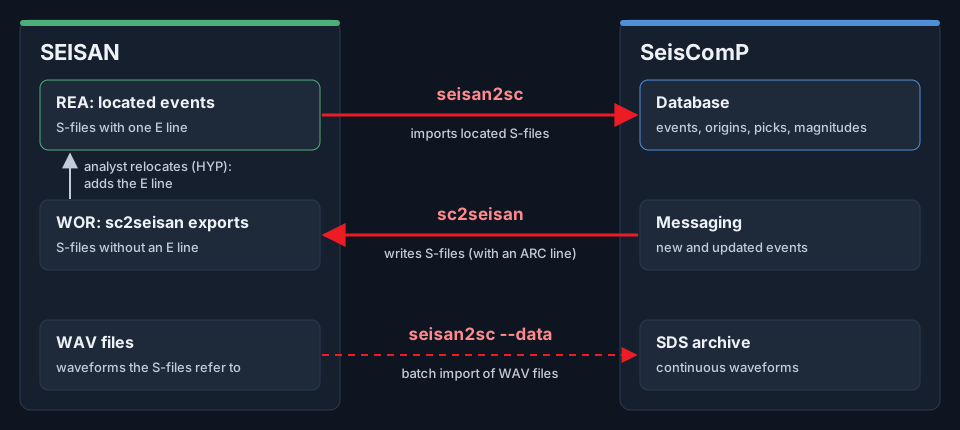
How seisan2sc and sc2seisan move data between SEISAN and SeisComP.
seisan2sc runs in two modes:
Real-time mode: watches a SEISAN directory tree and imports new or changed S-files into the SeisComP database.
Batch-import mode: imports all S-files in a directory once (e.g. legacy data), and exits.
In both modes, S-files are read, converted to SeisComP XML and loaded into the SeisComP database. In batch-import mode seisan2sc can also import the WAV files the S-files refer to into the SDS archive.
seisan2sc adds a new origin, or updates it if the same origin is already in the database. You can import an S-file more than once without adding duplicates.
Installation and license
seisan2sc is installed on the SeisComP machine with the installer OSOP provides (seisan2sc-install.sh). It needs
Docker, and the installer downloads the official SeisComP package it builds on. Then:
Print the machine ID and send it to OSOP:
$ sudo seisan2sc id
Save the license file OSOP sends back as
/opt/osop/license/seisan2sc.key, and check it:$ sudo seisan2sc check
seiscomp start seisan2sc refuses to start without a valid license and prints the machine ID.
Mode 1: Real-time mode
Configure seisan2sc in scconfig (Modules >> OSOP >> seisan2sc), save and exit. Set the path to the SEISAN.DEF file of your SEISAN installation (Input >> stations).
Configure scevent: make sure SEISAN’s agency is listed in
eventAssociation.agenciesand the magnitude types you import (e.g. ML, Mw) are listed ineventAssociation.magTypes.Enable and start seisan2sc and scevent:
$ seiscomp enable scevent seisan2sc
$ seiscomp start scevent seisan2sc
Check they are running:
$ seiscomp status scevent seisan2sc
seisan2sc does not restart scevent. If imported origins don’t turn into events, restart scevent by hand
(seiscomp restart scevent).
Mode 2: Batch-import mode
Configure seisan2sc and scevent as in steps 1 and 2 above, and make sure scevent is running.
Import a directory of S-files:
$ seisan2sc run --import /path/to/sfiles
Optionally also import the waveforms the S-files refer to into the SDS archive:
$ seisan2sc run --import /path/to/sfiles --data
This scans the directory, imports all S-files found in it, and exits.
Which S-files are imported
seisan2sc imports only events located in SEISAN: S-files with exactly one type E line (hypocenter errors, written by SEISAN’s locator HYP). Other files are skipped and logged as INFO, not as errors:
files with no E line: unlocated events, and raw sc2seisan exports;
files with several E lines (e.g.
collect.out,hyp.out);events outside the configured region (
filter.*).
This rule matters when sc2seisan writes into the same SEISAN tree: sc2seisan writes no E line, so seisan2sc never re-imports sc2seisan’s own exports, and events don’t loop between the two systems. An event exported by sc2seisan and then relocated in SEISAN gets an E line and is imported.
Implementation
Network and location codes: SEISAN.DEF
S-files carry only station codes; SeisComP needs the full network, station, location and channel codes. seisan2sc looks them up in SEISAN’s own SEISAN.DEF file (its ARC_CHAN records).
Note
The SEISAN.DEF installed with seisan2sc is only an example. On a live system, set Input >> stations in scconfig to the SEISAN.DEF file of your SEISAN installation.
Note
If a station in an S-file is not in SEISAN.DEF, seisan2sc logs an ERROR message.
Note
ARC_CHAN lines can carry a start and end date. seisan2sc uses them to tell apart two stations with the same code in different time periods.
Tracing an imported object back to its S-file
S-files have no unique identifiers, and one S-file can hold several locations. To trace from SeisComP back to the
original S-file, the author field is set to seisan@<S-file name>, for example
seisan@03-1842-37L.S201504
and the public IDs of picks, origins, magnitudes and focal mechanisms end with the line number they come from, for
example ...@line78.
Phases and weights
Every phase in the S-file is linked to the origin, including phases without a distance or azimuth (not located in SEISAN). The phase-line columns are mapped as SEISAN defines them:
S-file column |
SeisComP |
Notes |
|---|---|---|
Onset (I / E) |
pick onset impulsive / emergent |
|
Weight blank or 0 |
arrival weight 1.0, time used |
|
Weight 1 / 2 / 3 |
arrival weight 0.75 / 0.5 / 0.25, time used |
SEISAN’s own scale |
Weight 4 |
arrival weight 0, time not used |
SEISAN does not use these phases |
Weight 9 |
arrival weight 0, time not used |
S-P only; no absolute time |
First motion C / D |
pick polarity positive / negative |
Picks are imported as manual picks.
Magnitudes
Magnitude letters follow the SEISAN manual and are imported with SeisComP’s names: L → ML, b → mb, B → mB, s → Ms, S → MS, W → Mw, C → Md, G → MbLg, N → MN. Older letters are still read (w → Mw, D → Md, v → MLv, h → MLh, r → MLr, p → Mwp, l → ML). Unknown letters are skipped. sc2seisan uses the same table in the other direction.
ML from amplitudes
Station ML values are computed from the amplitudes and periods in the S-file:
ML = a*log10(amp) + b*log10(dist) + c*dist + d
where amp is the amplitude and dist the hypocentral distance in km (the S-file’s epicentral distance combined
with the event depth). a, b, c and d are set in scconfig (Magnitude).
Other special considerations
S-files that use commas instead of decimal points are accepted.
Logging
Logs are written to ~/.seiscomp/log/seisan2sc.log of the SeisComP user. seisan2sc logs shows the service’s
console output.
Technical support
If you have any questions, contact OSOP support at support@osop.com.pa.
Configuration
Set these in scconfig (Modules >> OSOP >> seisan2sc) or in seisan2sc.cfg. The defaults are in $SEISCOMP_ROOT/etc/defaults/seisan2sc.cfg.
- input.directory
Type: string
Default:
/opt/seismoDirectory in which incoming S-files appear.
- input.stations
Type: string
Default:
/opt/seiscomp/share/seisan2sc/SEISAN.DEFPath to SEISAN.DEF file of your SEISAN installation
- input.interval
Type: integer
Default:
2Interval in seconds between the directory scans
- origin.author
Type: string
Default:
seisanAuthor of the event to be used in the SeisComP XML.
- origin.agency
Type: string
Default:
AGENCYReporting agency to be used in the SeisComP XML.
- origin.preferred
Type: boolean
Default:
trueif true, preferredOrigin is written; otherwise it is not.
- origin.method
Type: string
Default:
LOCSATLocation method, default LOCSAT
- origin.model
Type: string
Default:
iasp91Earth model ID, default iasp91
- logging.level
Type: integer
Default:
3Logging level (1=ERROR, 2=WARNING, 3=INFO, 4=DEBUG).
- license.directory
Type: string
Default:
~/.seiscomp/licensesOld installations only (LEGACY v1 license, seisan2sc-license.txt and seisan2sc-license.key). Installations from the OSOP installer ignore this: the license is /opt/osop/license/seisan2sc.key.
- waveform.WAVdir
Type: string
Default:
/opt/seisan/WAVDirectory where SEISAN stores waveform files
- waveform.SDSdir
Type: string
Default:
/opt/seiscomp/SDSDirectory of the SeisComP SDS archive
- magnitude.a
Type: float
Default:
1.0‘a’ parameter for Ml station magnitudes
- magnitude.b
Type: float
Default:
1.019‘b’ parameter for Ml station magnitudes
- magnitude.c
Type: float
Default:
0.0016‘c’ parameter for Ml station magnitudes
- magnitude.d
Type: float
Default:
-1.79‘d’ parameter for Ml station magnitudes
- filter.minLat
Type: float
Default:
-90.0minimum latitude (deg)
- filter.maxLat
Type: float
Default:
90.0maximum latitude (deg)
- filter.minLon
Type: float
Default:
-180.0minimum longitude (deg)
- filter.maxLon
Type: float
Default:
180.0maximum longitude (deg)
- nearest_city_fix.enable
Type: boolean
Default:
trueenable this option
- nearest_city_fix.host
Type: string
Default:
localhostdatabase host
- nearest_city_fix.user
Type: string
Default:
sysopdatabase user
- nearest_city_fix.password
Type: string
Default:
sysopdatabase password
- nearest_city_fix.database
Type: string
Default:
seiscompname of the database
Command-line options
- --import
Scan a directory, import all the S-files found in it, and exit. Run as: seisan2sc run –import DIR
- --data
Only with –import: also import the SEISAN WAV files the S-files refer to into the SDS archive.